
SharonHD
New member
- Joined
- Sep 22, 2022
- Messages
- 17
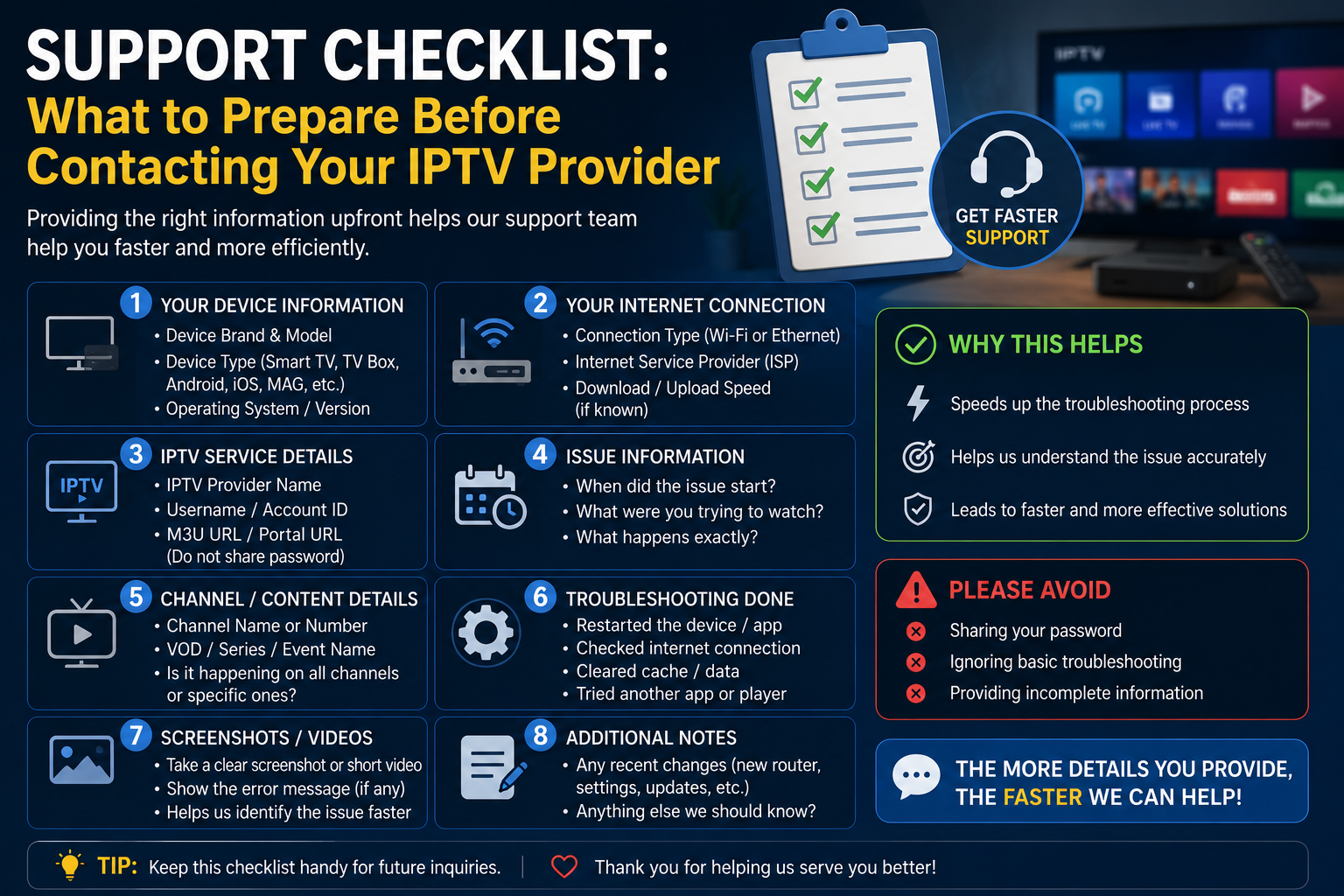
A well-prepared support request gets resolved faster. This checklist helps you gather the right information before contacting your IPTV provider, reducing back-and-forth and getting to a solution quicker.
The most common reason support tickets drag on for days is missing information. Support agents cannot diagnose the problem without your device details, app version, and a clear description of what you have already tried.
A complete first message that includes all the relevant details typically gets a specific, actionable response. A vague first message ("IPTV not working") gets a request for more information — adding at least a day to resolution.
Device information:
• Device type and model (e.g., Firestick 4K Max, Mecool KM7, MAG 524)
• Operating system and firmware version
• Available storage space
App information:
• App name and version number
• Connection type (Xtream Codes or M3U)
Network information:
• Connection type (Ethernet or Wi-Fi)
• Speed test result at peak hours (not just headline broadband speed)
• ISP name
Problem description:
• Exact error message (if any) — photograph it
• Which channels are affected (all channels or specific ones?)
• When the problem started and what changed around that time
• What time of day does the problem occur?
• What you have already tried to fix it
Before raising a ticket, confirm you have done these basic checks:
1. Restarted the streaming device
2. Restarted the router
3. Tested on Ethernet (not Wi-Fi)
4. Cleared the app cache
5. Verified the credentials are entered correctly
6. Tested a different IPTV app to determine if it is app-specific or service-specific
Do not post your full password, M3U URL, Xtream Codes URL, or portal URL in public forums. Raise a support ticket with your provider through their official channel for anything involving private account details.
Format: "Device: Firestick 4K Max | App: XCIPTV 4.0.2 | Connection: Ethernet | Speed: 45 Mbps at 8pm | Problem: HD channels buffer every 2–3 minutes between 7–10pm only. HD fine at all other times. 4K and SD also buffer at the same times. Started 4 days ago — no changes made. Already tried: restart device, restart router, clear app cache."
This format gives support everything they need in the first message.
Why Preparation Matters
The most common reason support tickets drag on for days is missing information. Support agents cannot diagnose the problem without your device details, app version, and a clear description of what you have already tried.
A complete first message that includes all the relevant details typically gets a specific, actionable response. A vague first message ("IPTV not working") gets a request for more information — adding at least a day to resolution.
Information to Gather Before Contacting Support
Device information:
• Device type and model (e.g., Firestick 4K Max, Mecool KM7, MAG 524)
• Operating system and firmware version
• Available storage space
App information:
• App name and version number
• Connection type (Xtream Codes or M3U)
Network information:
• Connection type (Ethernet or Wi-Fi)
• Speed test result at peak hours (not just headline broadband speed)
• ISP name
Problem description:
• Exact error message (if any) — photograph it
• Which channels are affected (all channels or specific ones?)
• When the problem started and what changed around that time
• What time of day does the problem occur?
• What you have already tried to fix it
Self-Checks Before Contacting Support
Before raising a ticket, confirm you have done these basic checks:
1. Restarted the streaming device
2. Restarted the router
3. Tested on Ethernet (not Wi-Fi)
4. Cleared the app cache
5. Verified the credentials are entered correctly
6. Tested a different IPTV app to determine if it is app-specific or service-specific
What Not to Include
Do not post your full password, M3U URL, Xtream Codes URL, or portal URL in public forums. Raise a support ticket with your provider through their official channel for anything involving private account details.
How to Write the Support Message
Format: "Device: Firestick 4K Max | App: XCIPTV 4.0.2 | Connection: Ethernet | Speed: 45 Mbps at 8pm | Problem: HD channels buffer every 2–3 minutes between 7–10pm only. HD fine at all other times. 4K and SD also buffer at the same times. Started 4 days ago — no changes made. Already tried: restart device, restart router, clear app cache."
This format gives support everything they need in the first message.
Last edited by a moderator: